















Streaming Media Player WiFi 6 Buyer’s Guide
B2B Procurement: The Enterprise WiFi 6 Streaming Media Player Guide
In high-density commercial environments—such as corporate offices, luxury hotels, medical centers, and public retail spaces—wireless spectrum congestion is the primary cause of video frame drops, buffer pauses, and offline device alerts. The mass adoption of high-bitrate 4K AV1 video profiles has placed an unprecedented strain on legacy 802.11ac (WiFi 5) infrastructure.
The transition to WiFi 6 (802.11ax) is not just a bandwidth upgrade. It is a structural shift in how wireless data packets are organized, scheduled, and prioritized. For B2B system integrators, selecting a streaming media player with true enterprise-grade WiFi 6 implementation requires looking deep into the hardware layout, internal antenna arrays, and kernel driver optimization.
1. Deconstructing the Spec Sheet: Why WiFi 6 Matters to B2B Operators
Consumer marketing often focuses entirely on peak theoretical speeds. However, for commercial deployments, raw speed is secondary to spectral efficiency and connection density.
WiFi 6 introduces three core protocols that directly resolve enterprise connectivity issues:
-
OFDMA (Orthogonal Frequency-Division Multiple Access): Instead of dedicating an entire wireless channel to a single media player during transmission, OFDMA subdivides channels into smaller sub-channels called Resource Units (RUs). This allows an enterprise access point to stream digital signage assets or interactive data streams to dozens of media players simultaneously, reducing wireless latency by up to 75%.
-
Target Wake Time (TWT): In smart buildings and industrial IoT networks, battery-powered sensors and peripheral devices must conserve power. TWT allows the media player to negotiate sleep-and-wake schedules with the access point. This minimizes unnecessary wireless activity, reduces power consumption, and clears the airwaves for active video streams.
-
BSS (Basic Service Set) Coloring: In modern venues, overlapping WiFi networks on the same channel cause packet collision and backoff delays. BSS Coloring assigns a numerical "color" tag to local packets. If a media player detects traffic from a neighboring network with a different "color," it ignores the signal and continues transmitting without interruption, eliminating co-channel interference.
2. PCBA Hardware Customization: Engineering RF Stability
An enterprise-class WiFi 6 chipset—like those integrated into our Amlogic S905X5 or Rockchip RK3588 designs—is only as effective as the physical RF (Radio Frequency) layout on the motherboard. Standard consumer-grade TV boxes use cheap, unshielded PCBA traces and basic adhesive internal copper patches that suffer from electromagnetic interference (EMI).
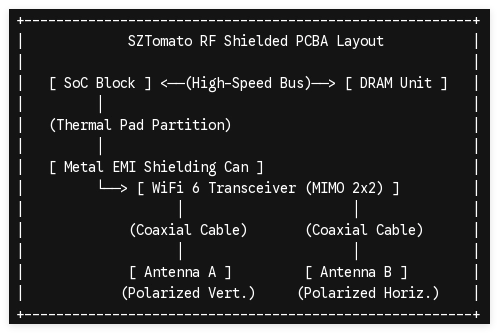
To counter this, SZTomato’s B2B engineering process focuses on three critical RF customizations:
2x2 MIMO Dual-Polarized Antennas
Cheap streaming media players utilize a single internal PCB trace antenna, which is highly prone to polarization loss. We configure our hardware with dual, independent internal copper-patch or external dipole antennas arranged in a 2×2 MIMO configuration. Placing the antennas at 90-degree offsets ensures optimal reception regardless of how the player is mounted behind a commercial display panel.
Active Metal Shielding (EMI Cans)
High-frequency signals generated by the RAM and CPU can leak RF noise directly into the wireless receiver. We solder dedicated metal shielding cans over the WiFi module and the main SoC to prevent internal crosstalk and keep the signal-to-noise ratio (SNR) exceptionally high.
Impedance Matching and Low-Loss Tracks
Our multi-layer PCB design features microstrip transmission lines matched precisely to 50 ohms. This optimization minimizes signal attenuation between the wireless IC and the antenna connector, reducing transmission errors and packet loss.
3. Kernel and Firmware-Level Optimizations for Uninterrupted Streaming
Even the most robust RF hardware can fail if the operating system lacks commercial-grade networking controls. Stock Android distributions are designed to drop unstable wireless connections, search for alternative access points, or sleep background processes. In a commercial environment, this behavior causes immediate black screens and system downtime.
We modify the underlying Android and Linux kernels specifically to keep media feeds running smoothly:
1
Driver Tuning & Channel Lock
Bootloader Level
1.Driver Tuning & Channel Lock:Bootloader Level。
We modify the wireless network driver to restrict the streaming media player from scanning for alternative SSIDs while actively streaming content. By disabling background Wi-Fi scanning, we eliminate the temporary packet drops that occur during active scans.
2
Enterprise Security Integration
OS Security Layer
2.Enterprise Security Integration:OS Security Layer。
We integrate robust WPA3-Enterprise security protocols and 802.1X network authentication directly into the system build. This allows the media player to safely connect to highly secured corporate and hospitality networks without requiring user interaction.
3
Seamless Roaming Configuration
Roaming Subsystem
3.Seamless Roaming Configuration:Roaming Subsystem。
We optimize the kernel's 802.11r (Fast Transition Roaming) protocol parameters. If a mobile display platform or transit-based media player moves between wireless access points, the connection handoff occurs in less than 50 milliseconds, preventing video buffering.
4
Failsafe Network Watchdog
Firmware Daemon
4.Failsafe Network Watchdog:Firmware Daemon。
We write a background system service that monitors wireless link quality and gateway pings. If the connection fails or drops packets for a specified threshold, the daemon automatically restarts the wireless interface or switches to local fallback storage to keep media looping.
4. Hardware Selection Matrix for WiFi 6 Deployments
Choosing the right hardware configuration ensures your system budget aligns perfectly with the technical needs of your environment:
| Deployment Environment | Primary Network Obstacle | Recommended Silicon Platform | Preferred WiFi Configuration |
|---|---|---|---|
| High-Density Hospitality (Hotels) | High channel noise, thick concrete walls | Amlogic S905X5 | WiFi 6, 2×2 MIMO, WPA3-Enterprise |
| Interactive Digital Kiosks | Metal enclosure, high static EMI | Rockchip RK3588 | WiFi 6 with external dual-band SMA antennas |
| B2B Video Conferencing | High-bandwidth upstream, real-time sync | Rockchip RK3576 | WiFi 6E/7 (6 GHz spectrum) for zero-latency audio/video |
The SZTomato Difference: We do not manufacture generic consumer streaming sticks. For over 16 years, SZTomato has worked directly with system integrators and B2B buyers to develop hardened, custom-engineered media players. From minor PCBA modifications to root-level firmware configuration and robust thermal engineering, we build hardware meant for continuous, high-availability deployments.
Ready to consult with our engineering team on custom WiFi 6 hardware?
