















What are the system requirements for a Streaming Media Player?
The EDID and HDCP Bottle-neck in Commercial Media Streaming
In commercial Android TV Box and digital signage deployments, field failures rarely stem from application-layer crashes. Instead, the primary source of intermittent downtime is the physical and electrical interface between the Streaming Media Player and the display panel. System integrators frequently battle Extended Display Identification Data (EDID) handshake dropouts and High-bandwidth Digital Content Protection (HDCP) authentication failures, which manifest as black screens or flashing displays in the field.
For high-uptime environments—such as QSR menu boards, hospitality IPTV, and corporate networks—the choice of connection protocol dictates the stability of the entire hardware ecosystem. Resolving these issues requires moving past consumer-grade assumptions and analyzing the interface at the PCBA and firmware layers.
1. HDMI 2.1 vs. Legacy AV vs. USB-C: Architecture and Use Cases
Selecting the correct interface requires balancing bandwidth requirements, mechanical durability, and backward compatibility. The three primary connection architectures each serve distinct operational roles.
HDMI 2.1 / 2.0b: The Enterprise Standard
For modern deployments, HDMI remains the baseline. HDMI 2.1 provides up to 48 Gbps of bandwidth, supporting uncompressed 4K resolution at 120Hz or 8K at 60Hz.
From a firmware engineering standpoint, HDMI enables crucial control protocols:
-
HDMI-CEC (Consumer Electronics Control): Allows the Android TV Box to pass power-on, power-off, and input-switching commands directly to the display, eliminating the need for separate display management cabling.
-
HDCP 2.3 Compliance: Necessary for hardware-level decryption of premium OTT DRM content (Widevine L1).
Legacy AV (CVBS / RCA): Industrial Backward Compatibility
While consumer markets have completely abandoned composite video (CVBS), the B2B sector frequently requires legacy AV outputs via 3.5mm TRRS jacks. This is highly relevant in transport sectors, medical diagnostic mirroring, and emerging market hospitality upgrades where CRT displays or early-generation LCD panels are still in active service.
Hardware modifications for these builds require custom PCBA engineering to integrate dedicated digital-to-analog converters (DACs) directly onto the mainboard to convert the processor's native digital video pipeline to an analog signal without thermal overhead.
USB-C (DisplayPort Alt Mode): Single-Cable Infrastructure
USB-C is increasingly specified in premium digital signage and interactive kiosk environments. Utilizing DisplayPort Alternate Mode, a single USB-C interface handles 4K video transport, multi-channel audio, USB data pass-through for touch-panel overlays, and USB Power Delivery (PD). This architecture allows the commercial display to power the Android TV Box directly, simplifying cable management and reducing point-of-failure power adapters.
2. Technical Comparison of Interface Specifications
| Specification / Parameter | HDMI 2.1 | USB-C (DP Alt Mode) | Legacy AV (CVBS) |
|---|---|---|---|
| Max Resolution Support | 8K @ 60Hz / 4K @ 120Hz | 8K @ 60Hz / 4K @ 120Hz | 480i / 576i (Standard Def) |
| Max Data Bandwidth | 48 Gbps | Up to 40 Gbps (DisplayPort 2.0) | < 6 MHz (Analog Video) |
| Control Signal Layer | HDMI-CEC / I2C (DDC) | USB PD / USB Billboard | None |
| Content Protection | HDCP 2.2 / HDCP 2.3 | HDCP 2.2 / HDCP 2.3 | Macrovision (Optional) |
| Power Delivery Capability | Minimal (5V, 55mA for HDMI DDC) | Up to 100W / 240W (USB PD) | None |
| Primary Failure Point | Mechanical wear on ports | Cable length signal attenuation | Ground loop electrical noise |
3. Resolving EDID Handshake and Signal Integrity Failures
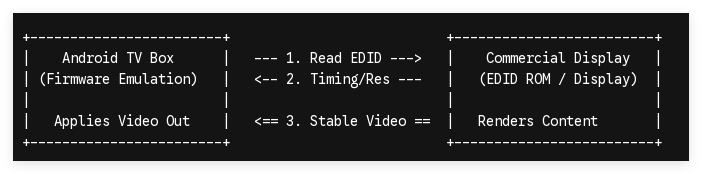
A recurring issue in large-scale deployments is the "loss of signal" error caused by corrupted or dropped EDID handshakes. When an Android TV Box boots, it reads the display’s EDID ROM via the display data channel (DDC) to determine native resolution and timing. Long cable runs (greater than 5 meters) or high-interference industrial environments regularly degrade this low-voltage signal.
Firmware-Level Mitigation
To guarantee absolute uptime, standard consumer firmware configuration is insufficient. OEM/ODM hardware customization should leverage custom bootloaders that execute EDID Emulation.
By hardcoding a fixed, target EDID profile directly into the Android kernel (boot.img or system-level properties), the media player bypasses the real-time hardware handshake entirely. If a display loses power or experiences an electrical fluctuation, the Android TV Box continues pumping the correct video timing over the TMDS channels, eliminating black screen states upon display recovery.
Hardware-Level Mitigation
For environments with high electromagnetic interference (EMI), the PCBA design must feature enhanced ESD protection arrays near the HDMI port. Utilizing active HDMI signal equalization chips or specifying optical hybrid HDMI cables for runs exceeding 10 meters preserves the signal integrity of the high-speed data lanes.
4. Hardware Optimization: Tailoring the Connection Protocol to the Use Case
The preferred connection type is determined strictly by the operational environment and the target hardware architecture:
-
For High-Traffic Retail Signage (24/7 Uptime): Implement HDMI 2.0b/2.1 coupled with a customized Android kernel that forces HDMI-CEC display synchronization. Ensure the PCBA uses a reinforced, surface-mounted HDMI connector with structural anchor points to prevent port shear from cable tension.
-
For Interactive Kiosks and POS Displays: Leverage USB-C DisplayPort Alt Mode. This cuts structural footprint by utilizing a single cable for power, video input, and returning USB touch-panel telemetry to the CPU.
-
For Retrofitting Industrial Systems: Configure an ODM Android Player with a native AV output matrix. Ensure the hardware specification includes isolated grounding loops on the PCBA to eliminate audio hum and video scrolling bars caused by shared industrial power grids.
Optimize Your Hardware Architecture
Operational efficiency in enterprise media networks requires specialized, application-specific hardware. Generic retail devices cannot withstand the rigorous demands of commercial operations.
As a dedicated ODM/OEM manufacturing partner, SZTomato delivers tailored Android TV Box and Digital Signage hardware engineered down to the firmware level. We specialize in custom PCBA development, fixed-EDID kernel compilation, and ruggedized enclosure designs to guarantee your network's maximum uptime. Contact our engineering and hardware strategy team today to submit your RFQ and review your custom board layout specifications.
