















How to Install Linux on an Android TV Box?
Modern System-on-Chips (SoCs)—such as the Amlogic S905X4, S928X-J, and Rockchip RK3588—deliver exceptional FLOPS-per-watt efficiency, making Android TV Box hardware an attractive form factor for enterprise edge nodes, digital signage players, and industrial controllers. However, deploying enterprise software stacks directly on stock Android OS introduces unnecessary operational overhead, rigid API boundaries, and background memory pressure.
Replacing Android with a light, production-ready Linux environment (such as Debian, Ubuntu Server, or custom Yocto distributions) provides direct kernel control, zero-overhead background processing, and full root system access. Achieving production stability requires bypassing vendor bootloader locks, compiling accurate Device Tree Blobs (DTB), and engineering hardware modifications capable of sustaining continuous 24/724/724/7 compute workloads.
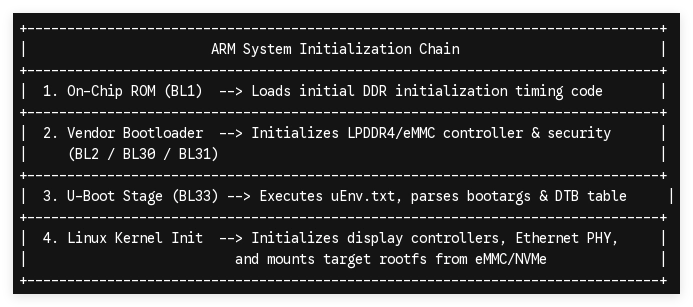
1. Boot Environment Architecture and Kernel Initialization Chain
Understanding the multi-stage boot sequence of ARM-based media players is critical before replacing the factory OS. Unlike x86 architectures using unified UEFI/BIOS interfaces, ARM platform initialization depends on a tightly coupled chain of hardware-specific binaries.
Bypassing Bootloader Restrictions
Standard consumer Android TV Boxes ship with locked fastboot states or signature checks on the boot partition (/dev/block/bootloader). To initialize external boot media (SD/USB):
-
The Recovery Intercept Method: Holding the onboard hardware recovery switch (typically recessed inside the 3.5mm AV jack) forces the primary U-Boot binary to read secondary initialization scripts (aml_autoscript, s905_autoscript, or boot.scr) from connected storage.
-
Environment Variable Overrides: Updating the U-Boot environment registers enables direct execution of unsigned kernel images (Image / zImage) via the run bootcmd sequence.
2. Technical How-To: Compiling, Flashing, and Mapping Linux Distros
Transforming an Android TV device into a Linux server involves three distinct technical execution phases: boot media creation, device tree identification, and internal eMMC deployment.
[Target ARM64 Board]
│
├──> Insert Flash Media (SD/USB with Ubuntu/Armbian Image)
│
├──> Trigger U-Boot Execution (AV Pin Reset / ADB reboot update)
│
├──> Load Device Tree Blob (.dtb matching PCBA Revision)
│
├──> Boot Linux Kernel (ttyAML0/ttyS0 Console Output)
│
└──> Execute 'dd' / Install Script to Flashing Internal eMMC
Phase A: Target Image Preparation & Device Tree (DTB) Configuration
Because Linux relies on explicit hardware mapping rather than runtime driver discovery, selecting or compiling the exact Device Tree Blob (.dtb) is essential. The DTB defines base memory addresses, interrupt lines, GPIO pinouts, Ethernet PHY models, and clock generators.
- Flash a headless ARM64 distribution (e.g., Debian or Armbian) to a high-end MicroSD card or USB 3.0 drive using dd or BalenaEtcher.
- Access the FAT32 BOOT partition and locate the target device tree directory.
- Select or rename the matching DTB binary (e.g., sc2_s905x4_1gbit.dtb or rk3588-custom-board.dtb) and declare it in the uEnv.txt or boot.config file:
Ini, TOML
# uEnv.txt configuration sample
dtb_name=/dtb/amlogic/sc2_s905x4_1gbit.dtb
bootargs=root=UUID=xxxx-xxxx-xxxx rootwait console=ttyAML0,115200n8 console=tty0 net.ifnames=0 quiet
Phase B: Triggering External Boot & Serial Console Debugging
Connect a USB-to-TTL serial adapter to the target board’s physical UART pins (TX, RX, GND) set to 115200 baud rate to monitor low-level kernel outputs.
-
Method 1 (Hardware Intercept): Depress the physical recovery button using a non-conductive pin while applying power.
-
Method 2 (Software Intercept): Boot the device into stock Android, enable Developer Options, establish an ADB session, and issue the boot redirect payload:
Bashadb connect 192.168.1.XXX adb shell su -c "reboot update"
Phase C: Committing Linux to Internal Storage (eMMC 5.1 / NVMe)
Running Linux long-term off MicroSD storage introduces catastrophic I/O bottlenecks and high media failure rates. To flash the installation directly to high-end internal eMMC 5.1 storage:
-
Log into the temporary live environment via SSH or direct console.
-
Execute the hardware block copy script (e.g., nand-sata-install or custom dd pipeline):
Bash# CAUTION: Wipes existing Android eMMC system partitions dd if=/dev/mmcblk0 of=/dev/mmcblk1 bs=1M status=progress
-
Update system boot flags and verify partition alignment (fdisk -l) to guarantee maximum wear leveling and read/write IOPS.
3. Structural Hardware Limitations & B2B Engineering Solutions
Converting consumer streaming hardware into industrial Linux endpoints reveals significant physical limitations in standard consumer PCBA layouts.
| Hardware Vector | Retail Consumer Box | SZTomato B2B OEM Solution | B2B Operational Advantage |
|---|---|---|---|
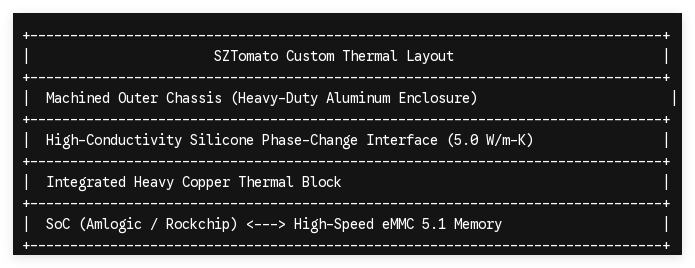
| Thermal Dissipation | Stamped thin aluminum / passive air | Heavy direct-copper cold plate + chassis heatsink | Eliminates thermal throttling under 100% CPU loads. |
| Network Physical Layer | 10/100M Realtek via USB bridge | Native RTL8211F Gigabit Ethernet PHY (1000BASE-T) | Delivers full wire-speed throughput without dropouts. |
| I/O & Expansion | Standard USB 2.0 (Host only) | PCIe 3.0 lanes, M.2 NVMe slots, RS-232/RS-485 headers | Direct integration with industrial sensors & displays. |
| Power Distribution | Unregulated 5V / Micro-USB | Locking 12V DC Jack or 802.3at PoE (25.5W) | Guarantees continuous power stability in high-EMF environments. |
Addressing Real-World Linux Porting Challenges
- Missing Driver Modules for Consumer Wi-Fi/BT: Consumer boxes frequently use cheap, non-standard Wi-Fi chipsets without open-source Linux kernel drivers. SZTomato solves this at the board level by using enterprise-grade Realtek or Qualcomm Wi-Fi 6 / Bluetooth 5.2 modules backed by fully upstreamed kernel drivers.
- HDCP & DRM Loss: Wiping Android removes vendor Widevine keys stored in secure TEE partitions. For non-media Linux applications (edge AI, IoT gateways, digital signage), this is irrelevant; however, for enterprise video playback, SZTomato provides custom dual-boot BSP configurations that preserve hardware-enforced DRM frameworks.
4. Enterprise Deployment & Turnkey OEM/ODM Capability
Attempting to manually unlock, flash, and debug thousands of off-the-shelf consumer Android boxes for enterprise deployments introduces extreme labor costs and elevated failure rates. System integrators require a hardware partner capable of delivering pre-configured Linux hardware straight from the assembly line.
At SZTomato, we bridge the gap between silicon-level engineering and enterprise software deployment. Over 16+ years of specialized OEM/ODM manufacturing allows us to deliver tailor-made hardware optimized specifically for Linux ecosystems:
-
Board-Level PCBA Modifications: Native Gigabit Ethernet routing, customized pin headers (RS-232/485, GPIO, I2C), and hardware Watchdog Timers (WDT) to automatically recover frozen nodes.
-
Pre-Flashed BSP Firmware: Deliver hardware straight from SMT lines pre-loaded with custom Ubuntu, Debian, or Yocto Linux builds, complete with private RSA key-signed bootloaders.
-
Industrial Thermal Design: Custom chassis engineering allowing sustained, unthrottled performance in harsh commercial environments operating up to 50∘C50^circtext{C}50∘C ambient temperatures.
Accelerate Your Linux Edge Deployment
Stop wasting engineering cycles hacking consumer streaming hardware. Partner with an established cross-border OEM/ODM manufacturer to design, build, and deploy high-performance ARM platforms engineered specifically for your Linux software stack.
Consult Our Hardware Architecture Team
Ready to deploy custom Linux-native media players, IoT gateways, or digital signage controllers? Contact the SZTomato engineering team today to review board schematics, order custom samples, or receive a competitive turnkey manufacturing quote.
