















Can I install any apps on a Set-Top Box (STB)?
Can I Install Any Apps on a Set-Top Box (STB)? The B2B Architecture Reality
The technical barrier to deploying commercial software on a Set-Top Box (STB) is steepening. With Google enforcing stricter Compatibility Test Suite (CTS) guidelines and silicon vendors like Amlogic hardening their secure boot structures, system integrators can no longer rely on simple retail sideloading. When a B2B operator asks if they can install any application on an Set-Top Box (STB), the answer from a consumer perspective is a soft "no." From an enterprise engineering perspective, however, it is a firm: "Yes, provided you control the firmware."
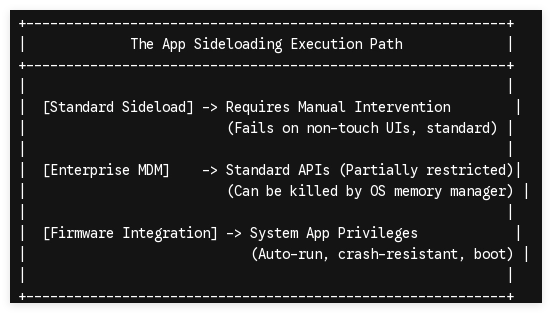
For digital signage operators, hospitality IPTV providers, and edge-computing networks, relying on standard application stores is an architectural risk. Below, we break down why applications fail on standard Set-Top Box (STB) hardware and how hardware-level customization resolves these failures.
1. The Core Roadblocks: Why Off-the-Shelf Set-Top Box (STB) Reject Custom Apps
Standard off-the-shelf Set-Top Boxes are designed for consumer streaming. This creates three primary technical bottlenecks for enterprise applications:
Android TV OS vs. AOSP Framework Restrictions
Many consumer Set-Top Box (STB) run official Android TV (or Google TV) rather than the Android Open Source Project (AOSP). Android TV enforces a strict "Leanback" launcher requirement. If your custom digital signage or IPTV application lacks a registered LEANBACK_LAUNCHER intent in its AndroidManifest.xml, the OS hides the app entirely from the home screen.
Hardware Decryption and DRM (Widevine & PlayReady)
High-value video distribution apps require secure media paths. If your enterprise application demands Widevine L1 decryption for 4K streaming, running it on an uncertified, generic box drops the resolution to 480p or causes a decoding crash. The application must align with the hardware’s secure bootloader, utilizing specific cryptographic keys burned into the SoC at the factory level.
Touchscreen to Non-Touch Interface Translation
Commercial applications built for tablets or mobile devices fail on standard Set-Top Box (STB) because they rely on touch-input classes. Without an integrated system-level pointer mapper or modified firmware to translate remote control (D-pad) inputs, the application becomes unusable.
2. Overcoming OS Barriers: System-Level & Kernel Customization
To deploy custom applications reliably—without manual configuration on every device—you must operate at the firmware level.
Injecting Apps into the System Partition
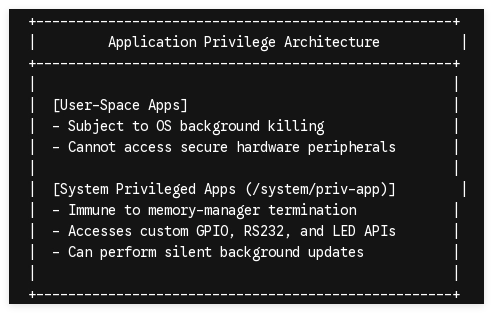
When SZTomato engineers a custom firmware image, we place your proprietary APK directly into the /system/app/ or /system/priv-app/ directory. By compiling the application into the system ROM:
-
The application gains root-level system privileges.
-
The app is immune to being cleared by the Android low-memory killer (LMK).
-
The software persists even if a user performs a factory reset on the device.
Custom SDK & API Integration
Commercial deployments often require hardware interaction. We modify the Hardware Abstraction Layer (HAL) and expose custom APIs, enabling your application to directly read and write to physical board connections (such as GPIO pins, RS232 serial interfaces, or custom status LEDs) that are typically closed off by standard Android security policies.
3. Designing a Fail-Safe B2B Hardware Platform
Software stability is directly tied to hardware environmentals. An application can only remain stable if the physical board can handle continuous 24/7 operating cycles.
| Engineering Vector | Technical Implementation | B2B Operational Benefit |
|---|---|---|
| Thermal Dissipation | Direct-contact aluminum heatsinks, ventilated alloy casing. | Eliminates SoC thermal throttling, ensuring constant 60fps rendering without dropouts. |
| Power Management | Custom PMIC (Power Management IC) & auto-boot hardware. | Immediate auto-power-on when AC power is supplied, bypassing manual power button steps. |
| Hardware Watchdog | Dedicated microcontroller monitoring the main CPU heartbeat. | Automatically cuts power and reboots the STB if the core OS or main application freezes. |
| Custom PCBA Ports | Optional Power-over-Ethernet (PoE), secondary RJ45. | Dual-line failover networks and single-cable deployments for retail displays. |
4. Deploying Apps Seamlessly via Enterprise OTA Update Systems
Once devices are deployed globally, manually updating your application is impossible. Commercial Set-Top Box (STB)s require a robust, silent deployment loop.
Standard Android devices require manual confirmation for application updates. By engineering custom Android firmware, we integrate a specialized OTA (Over-the-Air) Update client. This system talks directly to your private servers, pulling updated APK configurations in the background, verifying signatures at the kernel level, and installing them silently without interrupting the end-user display.
Tailor Your Set-Top Box (STB) Fleet with SZTomato
Installing any custom application on a Set-Top Box (STB) requires more than a simple USB drive. It requires a dedicated manufacturing partner capable of modifying the physical board, tailoring the underlying Linux kernel, and hardening the security parameters of the OS.
At SZTomato, we leverage 16 years of specialized B2B ODM/OEM engineering to build Set-Top Box (STB) and Digital Signage systems that match your exact software demands. From customized Amlogic/Rockchip PCBA layouts and dedicated cooling assemblies to deep system-level ROM development and private OTA client setups, we ensure your deployment remains under your absolute control.
Engage Our Engineering Team: Reach out to us at www.sztomato.com with your specific application parameters, API needs, or target hardware specifications, and let our senior engineering team build a custom proof-of-concept board for your enterprise fleet.
