















How do Android TV Box work?
How Do Android TV Boxes Work? A B2B Hardware & Firmware Engineering Deep Dive
The commercial media player market is undergoing a significant architectural shift. As hardware-accelerated AV1 decoding becomes standard and processing demands at the edge increase, enterprise buyers are looking beyond off-the-shelf consumer devices. Deploying digital signage, hospitality IPTV, or interactive kiosks requires a deep understanding of how an Android TV Box operates under the hood.
For a B2B system integrator, an Android TV Box is not a plug-and-play retail device; it is a highly specialized, programmable computing platform. Let's look at the hardware, firmware, and software layers that make these systems work, and how they can be customized for industrial reliability.
1. The Hardware Backbone: Silicon, Storage, and PCBA Layout
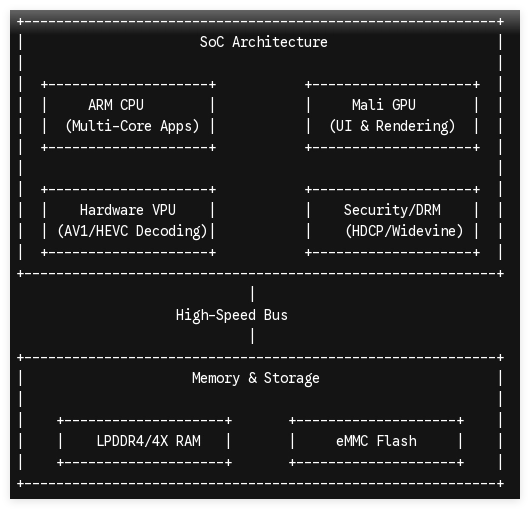
At the core of every Android TV Box is a specialized System on a Chip (SoC). Unlike desktop architectures that separate the CPU, GPU, and memory, an ARM-based SoC integrates all of these components onto a single piece of silicon to maximize thermal efficiency and minimize power draw.
Processor Dynamics (CPU & GPU)
Most commercial-grade hardware utilizes processors from silicon designers like Amlogic or Rockchip.
-
The CPU (typically multi-core ARM Cortex-A35, A53, or A55) handles systemic logic, application execution, and background operating system tasks.
-
The GPU (such as the ARM Mali series) manages 2D/3D rendering, user interface transitions, and basic graphical processing.
Hardware-Accelerated Video Processing Units (VPUs)
The VPU is the most critical silicon component for media deployment. Rather than relying on raw CPU power to decode heavy video streams, the VPU uses dedicated hardware pipelines to decode formats like H.265 (HEVC), VP9, and AV1 at up to 8K resolutions. This hardware-level decoding keeps CPU utilization under 15% during 4K playback, preventing thermal throttling and ensuring 24/7 operational uptime.
B2B Memory and Storage Architecture
Commercial environments demand industrial-grade components:
-
RAM: High-speed LPDDR4 or LPDDR4X memory provides the bandwidth necessary for smooth multi-window rendering and rapid app switching.
-
Storage: Non-volatile eMMC 5.1 flash storage offers high endurance and read/write speeds, protecting local cached video assets from corruption during unexpected power losses.
2. Operating System & Firmware: From Kernel to Application Layer
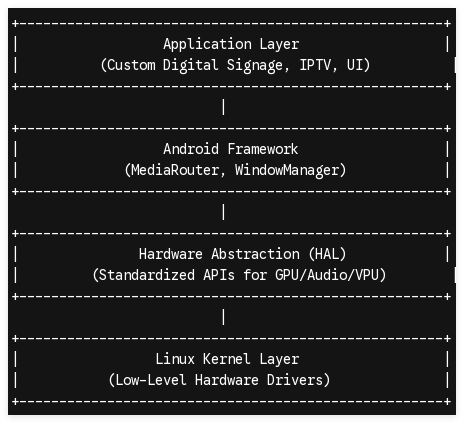
An Android TV Box runs on a modified version of the Android Open Source Project (AOSP) or official Android TV/Google TV operating systems. The execution pipeline follows a highly structured, layered stack.
The Bootloader and Kernel Initialization
When power is applied, the primary bootloader initializes the SoC's core components (RAM and storage interfaces) before passing execution to the U-Boot bootloader. The bootloader then loads the Linux Kernel, which contains the essential low-level drivers for hardware components like USB ports, Wi-Fi chips, Ethernet controllers, and HDMI output.
Hardware Abstraction Layer (HAL) and Android Runtime
Above the kernel sits the HAL, presenting standard APIs to the Android Framework. This layer ensures that regardless of whether you use an Amlogic or Rockchip SoC, the Android system can interact with the VPU or Wi-Fi module in a uniform way.
Enterprise Firmware Customization Pathways
Unlike retail-locked consumer units, commercial platforms require specialized firmware-level engineering to ensure operational stability:
-
Custom Android Boot Animation & UI: Overwriting the standard launcher with a proprietary, brand-aligned interface.
-
True Kiosk Mode: Locking the OS at the system level to prevent users from exiting the primary application or accessing system settings.
-
Over-The-Air (OTA) Private Servers: Establishing a secure, localized update infrastructure so you can push silent firmware updates to your entire hardware fleet without Google Play Services.
3. Peripheral Connectivity & AV Signal Pipelines
How a media player handles signal routing determines its viability in complex commercial environments.
| Subsystem | Technical Specifications | Commercial Application |
|---|---|---|
| HDMI Output | HDMI 2.1, HDCP 2.2 / 2.3, CEC | High-bandwidth 4K/8K rendering with secure copy protection and display power synchronization. |
| Ethernet | 10/100/1000 Mbps RJ45 | Reliable network failover; Gigabit speeds for high-bitrate video wall distribution. |
| USB Interfaces | USB 3.0 / USB 2.0 (OTG) | Connection points for interactive touchscreens, external cameras, and legacy serial decoders. |
| Wireless | Dual-Band Wi-Fi 6 (802.11ax), BT 5.x | High-density wireless deployment with minimal interference; BLE beacon tracking. |
Audio/Video Synchronization and Decryption
To display premium content from protected networks, the Android TV Box must support advanced digital rights management (DRM) keys. The media player decrypts incoming streams using hardware-enforced trusted execution environments (TEEs) running alongside Widevine L1 or PlayReady engines. The video signal is then routed through the HDMI pipeline with precise lip-sync (AV-sync) correction, maintaining perfect alignment between high-definition audio and video feeds.
4. Engineering Customized Solutions for Commercial Deployments
Generic retail hardware often fails in commercial settings due to poor thermal management, locked bootloaders, and restrictive board designs. Enterprise projects require a hardware partner capable of deep-level modifications.
Custom PCBA Layout and Mechanical Engineering
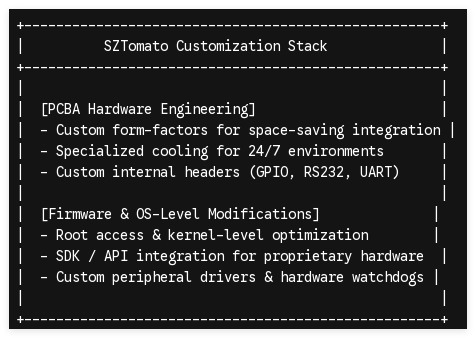
Commercial installations often require specific physical constraints. Custom engineering services allow you to modify the Printed Circuit Board Assembly (PCBA) layout to fit custom enclosures, add or remove specific physical ports (such as dual Ethernet or optical audio), and integrate hardware watchdog timers that automatically reboot the device in the event of a system hang.
Custom Cooling Solutions
Standard consumer media players are designed for intermittent home use. For 24/7 operations, heat dissipation is critical. Incorporating passive aluminum heatsinks or active-cooling chassis prevents thermal throttling and extends the lifespan of the eMMC storage and SoC.
Kernel-Level Optimization & Driver Development
Integrating custom peripherals—like commercial barcode scanners, thermal printers, or industrial touch panels—often requires writing custom kernel-level drivers and modifying the Android kernel to recognize non-standard USB or serial devices.
Partner with a Leading B2B Hardware OEM/ODM
Deploying a large fleet of media players requires hardware that is reliable, secure, and tailored to your specific application.
SZTomato has spent over 16 years providing end-to-end OEM/ODM customization services for the global B2B cross-border electronics sector. We specialize in custom PCBA development, firmware-level engineering, and comprehensive SDK/API integrations designed specifically for commercial and industrial use cases.
Get in Touch: Ready to build a media player designed for your specific business needs? Contact our engineering and B2B procurement team at www.sztomato.com to discuss your project specifications and request custom hardware evaluation boards.
