















How do I connect an Internet TV Box?
Commercial Deployment Guide: How to Connect and Provision an Enterprise Internet TV Box
Integrating a commercial Internet TV Box into an enterprise network infrastructure requires a systematic approach to hardware interfacing, network topology configuration, and firmware-level optimization. Unlike consumer deployments, commercial media delivery systems—such as those used in digital signage networks, hospitality IPTV systems, and corporate AV matrices—demand absolute uptime, predictable bandwidth consumption, and secure remote management.
This guide outlines the precise engineering protocols required to connect, configure, and scale hardware deployments successfully.
1. Physical Layer Integration and AV Signal Routing
The physical connection of an enterprise-grade Android media player forms the baseline for signal integrity and thermal stability. In commercial environments, devices are frequently mounted in server racks, enclosed kiosks, or behind heavy commercial displays, necessitating specific hardware protocols.
HDMI Architecture and EDID Handshaking
When connecting the device to a display or an AV-over-IP matrix, standard HDMI cables often fail over long distances. Integrators must utilize high-speed HDMI 2.0a/2.1 cables for localized connections up to 5 meters. For runs exceeding this distance, HDMI via Cat6 Extenders (HDBaseT) or active optical cables (AOC) must be deployed to prevent signal degradation and Extended Display Identification Data (EDID) handshake failures.
[Internet TV Box] ---> (HDMI 2.0) ---> [HDBaseT Transmitter] ---> (Cat6 Cable) ---> [HDBaseT Receiver] ---> [Commercial Display]
Incorrect EDID negotiation results in black screens or resolution downgrades. To mitigate this, configure the media player’s firmware to lock the output resolution (e.g., 3840×2160 at 60Hz) rather than relying on "Auto-Detect."
Power Infrastructure and Thermal Mitigation
Commercial deployments should bypass the standard DC wall adapters bundled with consumer hardware. Instead, employ one of the following methods:
-
Power over Ethernet (PoE+): Utilize a PoE+ to DC/RJ45 splitter capable of delivering a stable 5V/2A or 12V/1.5A DC output directly over the network drop. This reduces cabling overhead and allows remote power cycling via managed PoE network switches.
-
Dedicated Power Distribution Units (PDUs): For rack-mounted media players, connect all hardware to an IP-addressable PDU to facilitate automated reboots if a device hangs.
2. Network Topology and Bandwidth Optimization
A stable network connection is critical for seamless content delivery. While dual-band Wi-Fi 6 is acceptable for flexible layouts, hardwired infrastructure remains the gold standard for commercial stability.
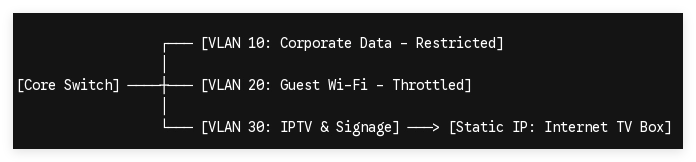
Wired Provisioning (RJ45 Gigabit Ethernet)
For 4K UHD video bitrates and uncompressed digital signage streams, assign the media player to a dedicated Virtual Local Area Network (VLAN) isolated from standard guest or corporate data traffic.
-
IP Allocation: Avoid DHCP address leasing for critical infrastructure. Provision each Internet TV Box with a Static IP address within your network architecture to allow for consistent monitoring via SNMP or Ping tools.
-
DNS Configuration: Manually assign low-latency, redundant DNS addresses (e.g., Primary: 1.1.1.1, Secondary: 8.8.8.8) within the Ethernet settings to eliminate domain resolution delays during content synchronization.
Wireless Provisioning (Wi-Fi 6 / 802.11ax)
When running ethernet cable is structurally impossible, configure the wireless deployment to utilize the 5GHz or 6GHz bands exclusively. The 2.4GHz spectrum is highly susceptible to interference from industrial machinery, microwaves, and mobile devices.
-
Enable WPA3-Enterprise authentication within the device network settings to comply with corporate security protocols.
-
Adjust the wireless roaming aggressiveness via the device settings or custom firmware to prevent the hardware from dropping packets when communicating with high-density mesh access points.
3. Firmware-Level Provisioning and MDM Integration
Connecting the hardware is only half the battle; provisioning the software ecosystem ensures long-term operational viability without requiring physical on-site maintenance.
| Feature / Deployment Phase | Consumer Setup | Enterprise B2B Setup |
|---|---|---|
| IP Addressing | Dynamic DHCP | Static IP Mapping / VLAN Segmentation |
| Power Management | Manual Standby Mode | Hardware Watchdog / Auto-Power On (AC-Loss) |
| OS Control | Standard Android UI / Google Play | Lean AOSP Customization / Locked Kiosk Mode |
| System Updates | Uncontrolled OTA Pop-ups | Controlled Centralized MDM Push |
Enforcing Kiosk Mode via AOSP
Standard Android launcher interfaces are unsuitable for commercial operations. Integrators must leverage Android Open Source Project (AOSP) firmware modifications or Mobile Device Management (MDM) agents to lock down the operating system.
-
Boot-on-Power: Program the kernel-level bootloader configuration (boot.img) to execute a hard power-on whenever AC power is detected, bypassing the physical power button completely.
-
Application Whitelisting: Disable the default system UI, status bars, and navigation panels. Set your target digital signage or IPTV application as the default custom launcher so that the system boots directly into the commercial interface within seconds of initialization.
Technical Support & Custom Engineering Inquiries
Scaling an Internet TV Box fleet across international commercial landscapes demands tailored hardware and firmware solutions that consumer-grade platforms cannot provide. Shenzhen Tomato Technology specializes in end-to-end OEM/ODM customization—offering custom PCBA engineering, specialized cooling systems, custom boot animation provisions, and deep-level AOSP firmware modification to meet strict corporate deployment standards.
Contact our technical sales team today to discuss your hardware specifications, sample evaluations, and bulk procurement workflows.
