















How to Install Linux on an TV Box?
How to Install Linux on a TV Box: Transforming Commercial ARM Hardware into Enterprise Edge Gateways
The utility of a standard Android-based TV Box in edge computing, thin-client computing, and network-attached storage (NAS) topologies is fundamentally capped by the overhead of the Android runtime environment. System architectures executing complex tasks—such as industrial sensor aggregation, containerized microservices via Docker, or continuous WebRTC video streaming—frequently struggle with Android's aggressive Low Memory Killer (LMK) algorithms and undocumented background telemetry.
The industry solution involves eliminating the Android user-space entirely. Upstream developments in the Linux mainline kernel for Application Specific Integrated Circuits (ASICs)—most notably within the Amlogic S905 series, Rockchip RK35xx series, and Allwinner platforms—now make it commercially viable to strip vendor Android images and deploy headless or lightweight Linux distributions. This structural migration converts cost-effective media hardware into high-performance, long-lifecycle Linux ARM64 edge computing nodes.
1. Hardware Prerequisite Mapping & PCBA Adaptations
Executing a bare-metal Linux installation on a standard TV Box requires an exact alignment between the silicon architecture and the software compilation. Unlike x86 platforms relying on an abstract UEFI/BIOS layer, ARM-based platforms necessitate a matching Device Tree to map system hardware addresses directly to the operating system kernel.
Before initiating software deployment, the underlying PCBA layout must be audited for industrial survivability. SZTomato's OEM/ODM engineering process approaches this layout through a clear, phased approach to prevent deployment failures:
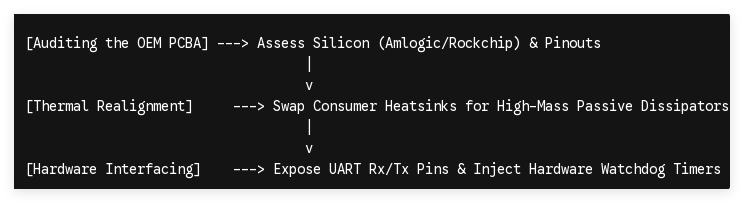
In long-duty Linux operations, consumer-grade thermal components fail rapidly. True B2B hardware adaptation requires desoldering generic aluminum plates and replacing them with high-mass, multi-finned passive aluminum or copper heat dissipators treated with phase-change interface materials. This keeps junction temperatures below 65°C under sustained multi-threaded computing loads, entirely eliminating thermal throttling. Furthermore, for unattended remote operations, the PCBA must be modified to expose the physical UART Rx/Tx pins directly for low-level console diagnostics and to integrate a hardware watchdog timer circuit via the GPIO bus, forcing a physical cold reboot if the Linux OS experiences a catastrophic kernel panic.
2. Technical Blueprint: Compiling and Flashing Linux Firmware
Deploying Linux onto an ARM-based media player platform utilizes a micro-SD card or an external USB drive to initialize multi-boot states before permanently flashing the internal memory storage.
Step-by-Step Installation Subsystem
1
Image Serialization and Media Burning
Requires high-endurance microSD or USB 3.0 flash drive
1.Image Serialization and Media Burning:Requires high-endurance microSD or USB 3.0 flash drive。
Procure a targeted Linux image tailored for ARM64 architectures (such as Armbian or Debian Minimal). Utilize a low-level block storage writer like dd or verified verification software to flash the raw .img binary directly onto your boot media.
2
Device Tree Blob (DTB) Extraction and Definition
Crucial for peripheral and memory mapping
2.Device Tree Blob (DTB) Extraction and Definition:Crucial for peripheral and memory mapping。
Mount the boot partition of your external media. Navigate to the /boot/dtb/ folder and locate the exact compiler file corresponding to your chipset architecture (e.g., meson-g12a-s905x2.dtb for an Amlogic S905X2 processor). Open the uEnv.txt or extlinux.conf configuration file in the root boot directory and explicitly declare this path to align the Linux kernel with the physical memory addresses of your SoC.
3
Bootloader Interception via Multi-Boot Protocol
Bypasses standard Android recovery chains
3.Bootloader Interception via Multi-Boot Protocol:Bypasses standard Android recovery chains。
Insert the prepared storage media into the target device. Intercept the standard boot process by engaging the physical recovery micro-switch—often located inside the AV output jack socket (the "toothpick method")—while connecting the DC power line. This pulls the boot pin low, instructing the stock U-Boot system to execute the external aml_autoscript or alternative bootloader configuration script instead of loading the local Android recovery partition.
4
Internal eMMC Migration and Final Provisioning
Permanent replacement of vendor firmware
4.Internal eMMC Migration and Final Provisioning:Permanent replacement of vendor firmware。
Once the Linux environment boots successfully from external storage, log in via SSH or the local console. Execute the internal system script (typically armbian-install or a custom flashing execution routine). This formats the internal non-volatile storage blocks (/dev/mmcblk0), builds a clean ext4 filesystem partition, copies the running operating system layout directly onto the onboard eMMC, and updates the native internal bootloader configuration to point directly to the new Linux core.
3. Post-Installation Kernel Optimization and Driver Realignment
Once Linux runs natively from the internal eMMC storage, the hardware platform requires fine-tuning to maximize compute efficiency and ensure structural data safety.
Post-Flash Configuration Topology:
[Bare Linux Kernel]
│
├──► Disable Wi-Fi/Bluetooth Subsystems (Reduces CPU Overhead & IRQ Interrupts)
├──► Implement Flash-Friendly Filesystem (F2FS / Ext4 with noatime flag)
└──► Isolate Native Apps via Custom APIs (Bypasses Android HAL Restrictions)
In standard consumer configurations, wireless chipsets (via SDIO or PCIe interfaces) continuously fire interrupt requests (IRQs), driving up CPU idle power consumption. For headless deployments, these modules should be explicitly blacklisted at the kernel level (/etc/modprobe.d/blacklist.conf) to maximize CPU allocation for core workloads.
Furthermore, standard desktop Linux distributions are highly write-intensive, which can rapidly degrade lower-tier eMMC silicon blocks through write amplification. Enterprise configurations should modify the file allocation table (/etc/fstab) to append the noatime option across all active storage mounts. This prevents the system from modifying data access timestamps during every read cycle, extending the lifespan of the storage medium. If your application relies on high-velocity data logging, integrate a Flash-Friendly Filesystem (F2FS) or establish an isolated RAM disk memory space to hold temporary log files.
4. Architectural Analysis: Linux vs. Android for Commercial B2B Fleets
Transitioning from a consumer Android framework to an enterprise-grade Linux system alters device performance, software stability, and data protection boundaries across large-scale hardware deployments.
| Technical Parameter | Standard Vendor Android OS | Mainline Enterprise Linux OS |
|---|---|---|
| System Memory Footprint | ~800MB – 1.2GB RAM at idle | ~80MB – 150MB RAM (Headless Minimal) |
| Storage Lifecycle Protection | Non-configurable storage write routines | Adjustable mounting options (noatime, commit=60) |
| Process Lifecycle Management | Unpredictable Low Memory Killer actions | Rigid POSIX/systemd priority models |
| Peripheral I/O Interfacing | Restricted API exposure via Android HAL | Direct block-level interface access via /dev/* |
| Network Security Control | Closed vendor stack with telemetry risks | Complete iptables / nftables firewall lockdown |
By migrating to Linux, system integrators gain complete control over process execution lifecycles. There are no proprietary framework abstractions to navigate—applications interface directly with system drivers via standard Linux commands. This enables the integration of robust security protocols, customized system telemetry, and custom OTA updates controlled exclusively through your corporate private network infrastructure.
Secure Your Edge Compute Infrastructure
Converting a cost-effective TV Box platform into an enterprise-grade Linux edge node requires deep hardware and firmware synchronization. SZTomato provides complete, industrial-grade OEM/ODM hardware customization, specialized PCBA component adaptations, and hardened firmware compilation pipelines to support large-scale enterprise Linux deployments.
Contact our cross-border engineering division today to submit your technical requirements, analyze your target device schematics, or evaluate customized component options for your next edge infrastructure rollout. Visit www.sztomato.com to connect with an engineering expert.
How to Install Linux on an Android TV Box demonstrates the basic diagnostic workflows, kernel verification processes, and architecture cross-checks required when setting up alternative operating environments on ARM-based hardware platforms.
