















What are the system requirements for a Set-Top Box(STB)?
Architecture & Hardware Optimization: Defining Commercial Set-Top Box (STB) System Requirements
Enterprise-grade deployments of Set-Top Box (STB) hardware—spanning hospitality IPTV networks, interactive digital signage, and edge AI applications—frequently fail due to a common miscalculation: over-speccing retail-grade silicon or under-speccing thermal and memory performance.
In commercial environments, an STB operates under continuous, 24/7 workloads. Defining the system requirements for these units demands a granular understanding of how system-on-chip (SoC) architecture, memory bandwidth, decoding pipelines, and Android Open Source Project (AOSP) or Linux firmware engineering interact under sustained operational stress.
1. Core Silicon: SoC Selection and Processing Architecture
The heart of an enterprise STB is the SoC, where processing efficiency balances against thermal dissipation. Unlike consumer products where burst processing is acceptable, commercial STBs require stable clock frequencies over prolonged periods.
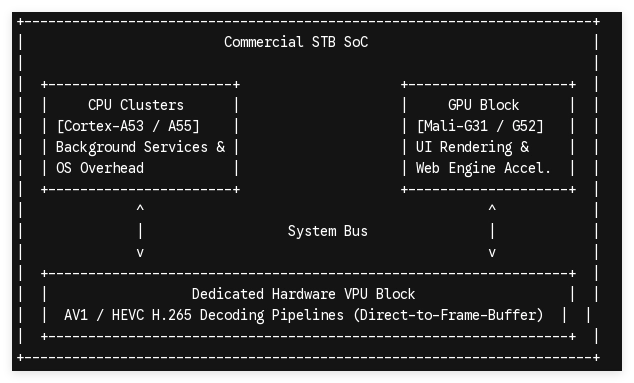
CPU Clusters
For standard high-definition (HD) or 4K signage and streaming applications, energy-efficient multi-core ARM architectures are standard. Quad-core Cortex-A53 or Cortex-A55 configurations operating between 1.5 GHz and 2.0 GHz provide the necessary compute overhead for operating system background processes, network stack management, and peripheral communication without generating excessive heat.
GPU Selection
Graphics processing units like the ARM Mali-G31 MP2 or Mali-G52 are essential not just for gaming, but for hardware-accelerating user interfaces (UI), rendering complex HTML5 widgets in digital signage web engines, and handling multi-layer composition in custom launchers.
Dedicated VPUs
The CPU and GPU must be insulated from video rendering duties. A dedicated Video Processing Unit (VPU) featuring native hardware decoding for modern codecs—specifically AV1, HEVC/H.265, and VP9 at 4K @ 60fps—is a non-negotiable system requirement. Hardware decoding reduces CPU utilization from over 80% to under 15%, dropping core temperatures and extending the hardware lifespan.
2. Memory and Storage Architecture: Bandwidth vs. Capacity
Data bottlenecks within an STB usually stem from poorly configured memory buses or low-grade flash storage, resulting in dropped frames and application UI stuttering.
| Hardware Component | Minimum Requirement (HD Signage/IPTV) | Recommended Configuration (4K Smart STB / Edge AI) | Critical Engineering Metric |
|---|---|---|---|
| System RAM | 2GB LPDDR3 / LPDDR4 | 4GB - 8GB LPDDR4X | Bandwidth and bus width (Minimum 32-bit width) |
| Storage (ROM) | 16GB eMMC 5.1 | 32GB - 128GB eMMC 5.1 / UFS | Write endurance and IOPS performance |
RAM Configuration
While 2GB is sufficient for single-purpose IPTV streaming applications, 4GB of LPDDR4 or LPDDR4X RAM is the functional baseline for multi-layered layouts, high-bitrate content caching, or localized edge applications. LPDDR4X operates at a lower voltage (1.1V vs 1.2V), directly decreasing the internal thermal footprint of the Printed Circuit Board Assembly (PCBA).
Storage Architecture
Storage selection impacts system boot times, over-the-air (OTA) firmware update reliability, and content caching. Low-tier STBs utilize basic flash that degrades quickly under heavy write cycles. Commercial builds require enterprise-grade eMMC 5.1 or Universal Flash Storage (UFS).
Furthermore, the firmware partition design must support an A/B dual-boot layout. This ensures that if a power disruption occurs during a remote firmware update, the STB rolls back to the previous stable system state rather than turning into an unbootable "bricked" unit in the field.
3. Connectivity, Interface I/O, and Thermal Topologies
Commercial deployments demand a robust physical and wireless network framework to maintain connectivity across unoptimized enterprise environments.
-
Ethernet Realities: While consumer devices rely heavily on Wi-Fi, commercial deployments prioritize physical infrastructure. A native RJ45 Gigabit Ethernet (10/100/1000 Mbps) port is mandatory for high-bitrate 4K streaming and high-reliability signage networks to eliminate wireless interference risks.
-
Wireless Protocols: Where cabling is impossible, dual-band Wi-Fi (802.11 ac/ax or Wi-Fi 5/6) paired with an external, high-gain antenna configuration replaces internal PCB traces to ensure signal penetration through dense building materials.
-
Peripheral I/O: Hardware configurations must include dedicated USB 3.0 ports for local storage expansion or touch-screen interaction, alongside an HDMI 2.1 port capable of HDCP 2.2/2.3 content protection compliance. For legacy displays, a dedicated 3.5mm AV port for analog output is frequently required.
Thermal Engineering: The Fanless Imperative
Mechanical fans represent a critical point of physical failure due to dust accumulation and bearing wear. Therefore, commercial STBs must feature custom passive cooling topologies.
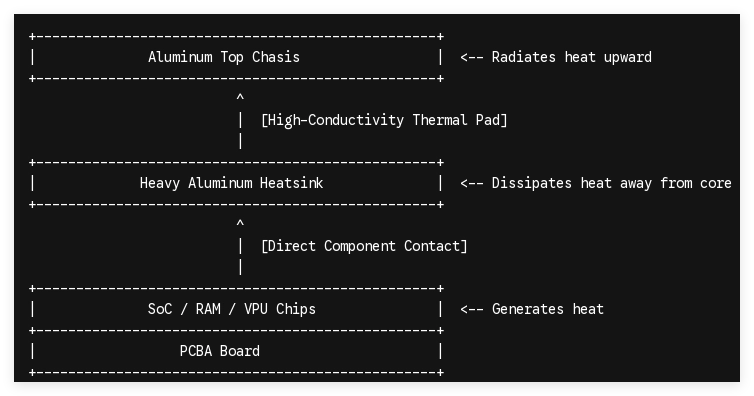
This engineering approach couples a heavy aluminum heatsink directly to the SoC via high-conductivity thermal pads, routing heat directly to an aluminum alloy top chassis. This design keeps the junction temperature of the processor well below 70°C, preventing thermal throttling even when enclosed behind commercial displays.
4. Firmware Optimization and OS-Level Customization
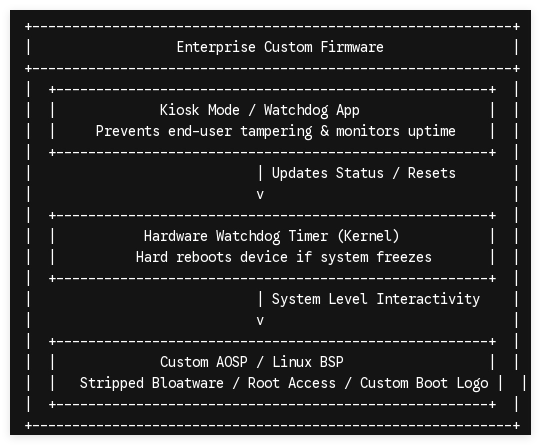
The best hardware specifications remain ineffective if the software layer is unoptimized. Commercial deployments typically avoid locked, consumer-oriented Android TV configurations in favor of specialized AOSP or Linux Board Support Package (BSP) builds.
OS Customization
Developing a clean AOSP or Linux kernel environment allows engineers to strip consumer bloatware, disable unneeded background services, and maximize available system RAM for client-specific software.
Boot Customization
B2B applications require a hardcoded boot-on-power feature (disabling the necessity of a physical power button interaction) and a custom boot logo/animation embedded directly into the bootloader partition for branded, seamless power cycles.
System Stability
Firmware-level integration of a hardware watchdog timer is vital. If the primary application layer hangs or freezes, the watchdog timer automatically triggers a hardware-level reset at the kernel level, ensuring system uptime without manual site visits.
Technical Consultation: Designing Your Custom STB Architecture
Selecting the right Set-Top Box system requirements means striking a precise balance between silicon performance, power efficiency, and hardware longevity. Over-engineering drives up acquisition costs, while under-engineering creates continuous operational vulnerabilities.
As a dedicated B2B OEM/ODM partner specializing in high-reliability hardware customization, Shenzhen Tomato Technology provides full firmware-level customization, custom PCBA layouts, and optimized thermal designs tailored to your specific infrastructure requirements. Contact our engineering team today to receive a complete technical evaluation and a hardware blueprint tailored for your next commercial deployment.
