















What is the preferred Android Mini PC to TV connection?
What is the Preferred Android Mini PC to TV Connection for Commercial Deployments?
When engineering commercial edge-computing hardware, the connection between an Android Mini PC and a digital display panel is never just a matter of plugging in a standard HDMI cable. For system integrators, digital signage operators, and IPTV providers, this interface represents a complex pipeline of electrical signals, handshakes, and thermal challenges.
The transition to high-throughput chipsets, such as the ARMv9-based Amlogic S905X5 and the Rockchip RK3588, has fundamentally changed the requirements for this connection. To achieve stable, long-term deployments, B2B procurement managers must look beyond consumer-grade specifications and focus on hardware-level customizations and deep kernel optimizations.
1. Physical vs. Logical Protocols: The Hardwired Standard
For commercial-grade reliability, HDMI 2.1b remains the industry's preferred physical interface for connecting an Android Mini PC to an industrial display. It provides the necessary bandwidth to support native 4K UI rendering at 60fps and heavy AV1-encoded video streams. However, the physical cable is only the transport layer. The true challenge lies in managing the logical and electrical protocols that govern the connection:
-
EDID (Extended Display Identification Data) Handshake Emulation: When a TV or commercial panel power-cycles, the Android Mini PC can lose the display's EDID handshake, causing the system to default to a low resolution (like 480p) or lose the video signal entirely. To solve this, SZTomato designs custom PCBA layouts featuring dedicated EDID emulators that store the target display’s resolution and refresh rate directly on the board. Even if the TV loses power, the Mini PC continues to output the correct resolution.
- HDCP Encryption Management: For IPTV operators and high-value corporate broadcasting, implementing Widevine L1 and PlayReady HDCP 2.2 or 2.3 encryption at the Android kernel level is critical to preventing unauthorized signal capture.
- HDMI CEC (Consumer Electronics Control) Customization: Consumer-grade CEC allows a simple remote to turn off both a TV and a box. In commercial environments, standard CEC can lead to system-wide synchronization failures. We modify the Android SDK and write custom APIs so that system integrators can issue low-level hex commands via the serial interface. This allows operators to schedule panel power cycles, adjust display backlighting, and poll display diagnostic metrics remotely over the local network.
2. Engineering the PCBA: Why Custom Hardware Prevents Field Failures
Most off-the-shelf retail Android devices fail in the field because their printed circuit boards are designed for intermittent household use rather than 24/7 industrial operation. High-speed signal transmission generates localized heat, which quickly leads to system instability if not properly addressed.
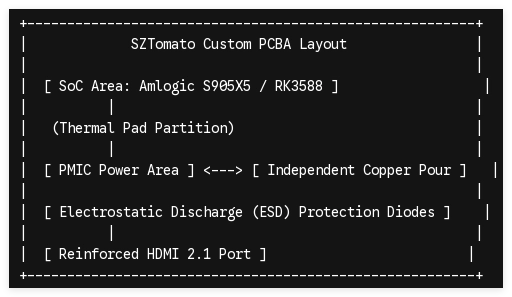
To ensure a continuous, flawless connection, our hardware customization process targets several critical areas of the PCBA layout:
High-Durability Interface Ports
Standard HDMI ports degrade under vibration or frequent maintenance cycles. We integrate reinforced, surface-mounted HDMI connectors with multi-point anchor pins soldered directly to the board. For space-constrained kiosks, we offer custom direct-mount physical HDMI male connections that eliminate failure-prone cabling entirely.
Dedicated ESD Protection
Connecting a live HDMI cable to a TV can cause electrostatic discharge (ESD) transients that fry the HDMI controller inside the main SoC. Our custom PCB designs place high-speed ESD protection diodes immediately behind the physical port pins to absorb voltage spikes up to ±15kV.
Thermal Separation
The System-on-Chip (SoC) and the Power Management IC (PMIC) are the primary heat generators on the board. By designing custom multi-layer PCBAs, we isolate the PMIC and the SoC onto different board zones or separate them with extensive copper pour areas. This prevents localized thermal hot spots, ensuring the hardware runs within safe temperature thresholds without downclocking.
3. Custom Firmware and Kernel-Level Optimization
Hardware is only as good as the software driving it. To prevent common connection dropouts and signal bugs, our engineering team optimizes the underlying Android and Linux kernels specifically for commercial deployment.
1
Kernel Driver Stripping
Prerequisite Phase
1.Kernel Driver Stripping:Prerequisite Phase。
We remove unnecessary consumer-grade drivers, Google services, and bloatware from the Android kernel to optimize RAM utilization and reduce potential software conflicts.
2
Force-Display Output Locking
Display Stability Phase
2.Force-Display Output Locking:Display Stability Phase。
We modify the kernel's display subsystem to disable the dynamic resolution auto-negotiation process. The output signal is locked permanently to the target display's specifications (e.g., 4K @ 60Hz), preventing blank screens during temporary display interruptions.
3
System-Level Kiosk Mode Integration
UI Lockdown Phase
3.System-Level Kiosk Mode Integration:UI Lockdown Phase。
The custom customer launcher is compiled directly into the system boot image as a persistent service. System navigation bars, status panels, and settings access are completely disabled at the firmware level to prevent end-user tampering.
4
OTA Update Customization
Deployment Management
4.OTA Update Customization:Deployment Management。
We configure a private Over-The-Air (OTA) update system allowing operators to safely push system patches, updated custom APIs, or new display profiles to thousands of devices across the network.
4. Specifying the Right Hardware for Your Deployment
Choosing the ideal connection architecture depends heavily on the computational and visual demands of your specific B2B use case:
| Commercial Application | Preferred SoC | Key Connection Requirement | Customization Focus |
|---|---|---|---|
| Interactive Retail Kiosks | Rockchip RK3588 | USB-C with DisplayPort Alternate Mode + dual RS232 interfaces | Integration of peripheral SDKs (scanners, printers) |
| High-Fidelity Digital Signage | Amlogic S905X5 | HDMI 2.1b with native 4K UI rendering and AV1 hardware decoding | Custom thermal solutions and PCB-level EDID lock |
| IPTV Operator Set-Top Boxes | Amlogic S905X4 / S905X5 | HDMI CEC custom mapping + Widevine L1 & PlayReady security | Custom branding, locked bootloaders, and OTA update systems |
Partner with SZTomato: For 16 years, SZTomato has delivered tailored OEM/ODM hardware solutions. We don't just sell generic retail boxes; we engineer custom PCBA, custom firmware, and specialized thermal enclosures to fit your exact business infrastructure.
Ready to discuss your custom hardware and firmware requirements with our engineering team?
