















What is the preferred Internet TV Box to TV connection?
The Preferred Internet TV Box to TV Connection: Commercial Signal Architecture & Implementation Guide
In large-scale commercial AV deployments, signal drops and black screens caused by communication failures represent a severe threat to operational efficiency. As corporate infrastructure moves from basic 1080p loops to data-heavy 4K and 8K workflows running at high frame rates, standard consumer connectivity fails to keep up. Retail hardware setups often run into data bottlenecks and encryption errors that cause system instability.
For commercial system integrators and procurement managers, choosing the preferred Internet TV Box to TV connection requires evaluating performance metrics far beyond a standard cable link. It demands precise control over hardware signal transmission, EDID (Extended Display Identification Data) handshaking, and structural component optimization to ensure continuous, high-fidelity operations.
1. Physical Component Optimization: Upgrading PCBA Layouts for Uncompressed Signal Routing
Consumer streaming players rely heavily on highly compressed, low-bandwidth ports to minimize manufacturing costs. In contrast, industrial deployments require dedicated component configurations engineered directly onto the printed circuit board assembly (PCBA).
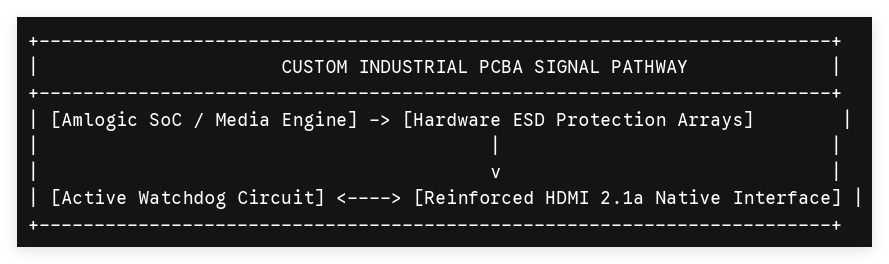
To achieve maximum data throughput for high-resolution setups, the physical connection must support uncompressed high-bandwidth standards, notably HDMI 2.1a with Display Stream Compression (DSC). This standard delivers a 48 Gbps data highway capable of handling 4K at 120Hz or 8K at 60Hz content streams smoothly.
Advanced Hardware Layer Modifications
Standard consumer connections often degrade under continuous long-term operation or in areas with high electromagnetic interference. Dedicated B2B manufacturing solves these vulnerabilities at the board layout layer:
-
Reinforced Structural Interfaces: Substituting fragile surface-mounted ports with through-hole, mechanically anchored connector housings prevents physical port failure during field maintenance.
-
Hardware ESD Protection Arrays: Integrating transient voltage suppression (TVS) diodes directly onto the differential signal lines shields the internal system-on-chip (SoC) from static electricity and voltage spikes travelling through the display cable.
-
Physical Hardware Watchdogs: To address system hangs caused by problematic display interfaces, a physical watchdog circuit continuously monitors system activity. If communication locks up, the hardware triggers an immediate power cycle, restoring operation without requiring on-site technicians.
2. Firmware-Level Control: Eliminating Communication Dropouts via EDID and HDCP Management
The main cause of unexpected black screens in enterprise setups is an error in the digital handshake between the media player and the display. This handshake relies on two core software components: EDID (which tells the player what resolution the screen supports) and HDCP (High-bandwidth Digital Content Protection) encryption.
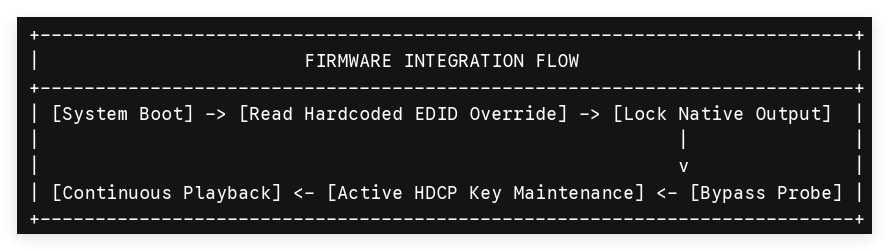
When multi-screen configurations or long-distance distribution amplifiers are introduced, the dynamic discovery process often fails. A custom firmware framework addresses this issue directly at the kernel level:
Hardcoded EDID Customization
Through targeted software development, engineers can replace standard dynamic display discovery with a permanent, hardcoded EDID configuration file directly inside the Android/Linux kernel. This modification forces the system's video engine (such as an Amlogic processor) to output a fixed, optimized video profile—like 4K at 60Hz with precise color maps—regardless of what intermediate splitters or display controllers report during startup.
Cryptographic Key Integration
To maintain a stable video stream, secure encryption keys must be handled flawlessly. During factory manufacturing, unique Widevine L1, PlayReady, and HDCP 2.3 cryptographic keys are injected directly into a protected partition of the device's eMMC storage.
Custom software optimization ensures these encryption keys remain active even when the screen is powered down or switched to a different input source, preventing playback errors when the display is turned back on.
3. Comparing Connection Formats for Commercial Environments
While HDMI 2.1a provides the core foundation for modern high-performance setups, enterprise installations use a variety of specialized connection types depending on distance requirements and the overall network layout.
| Connection Protocol | Maximum Transmission Distance | Ideal Commercial Application | Technical Trade-offs & Engineering Requirements |
| Native HDMI 2.1a (Copper) | Less than 3 meters | Localized Signage, Kiosks, Hospitality Displays | Provides uncompressed 48 Gbps bandwidth. Requires reinforced PCBA mounting to support heavy cables. |
| Active Optical Cable (AOC HDMI) | Up to 100 meters | Auditoriums, Retail Showrooms, Video Walls | Converts electrical signals to fiber optics. Requires stable, low-noise 5V power routing from the TV box's USB bus. |
| AV over IP / HDBaseT Extenders | Enterprise Network Scale | Campus Networks, Distributed Signage Systems | Converts video signals to IP packets via Gigabit Ethernet. Requires hardware-level optimization for low latency. |
B2B Procurement Optimization: Custom Integration with SZTomato
Deploying hundreds or thousands of streaming units across an enterprise network requires hardware that avoids the vulnerabilities of standard consumer-grade gear. White-box inventory and off-the-shelf retail media players cannot deliver the physical endurance or the software adaptability needed for mission-critical installations.
As a highly capable OEM/ODM production partner in the Android TV Box and digital signage sectors, SZTomato creates hardware engineered specifically for complex commercial deployments. We provide tailored PCBA architecture, robust passive cooling solutions, and deep firmware customization to ensure your hardware maintains an rock-solid connection to your commercial screens.
Contact our business development team today to access schematic source files, request evaluation samples based on dependable Amlogic silicon platforms, and collaborate on a custom firmware image tailored to your exact infrastructure needs.
