















How do I connect a Google TV Box?
How Do I Connect a Google TV Box? The Enterprise Integration & Customization Guide
The hardware connection layout of a commercial-grade Google TV Box underpins the reliability of enterprise digital signage, hospitality interactive systems, and edge-playback networks. While consumer installations rely purely on basic HDMI handshakes, enterprise-level deployment requires strict adherence to physical interface constraints, cryptographic protocols, and firmware stability.
Evaluating the physical, network, and systemic layers of a hardware connection ensures sustained uptime for complex commercial installations.
1. Technical Architecture: Physical and Protocol-Level Interconnection
A reliable deployment begins with a structured connection sequence. The diagram below illustrates the standard hardware and data routing required to maintain system integrity between the system SoC and peripheral architecture.
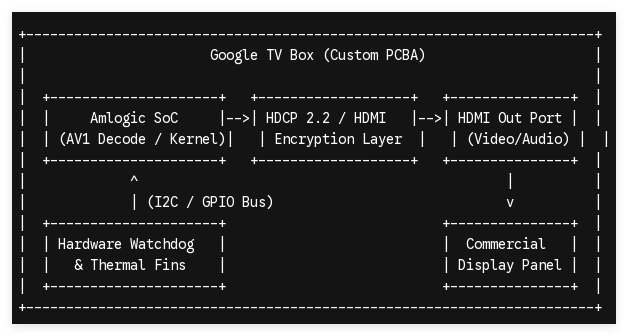
Phase 1: The HDMI Handshake and HDCP Compliance
Connecting a Google TV Box to a commercial display panel requires an immediate High-Bandwidth Digital Content Protection (HDCP 2.2) cryptographic handshake over the HDMI link. For system integrators utilizing matrix switchers or long-distance HDMI-over-IP extenders, a failure in this key exchange results in a black screen or a downgraded 480p fallback resolution.
-
Use high-speed, shielded HDMI 2.1 cables to eliminate electromagnetic interference (EMI) in high-density rack environments.
-
Ensure the target display panel supports the native EDID (Extended Display Identification Data) sent by the box's graphics framework to avoid aspect ratio distortion or mismatched refresh rates.
Phase 2: Power Delivery and Thermal Stabilization
Industrial deployments cannot rely on unstable USB power from the display panel. Enterprise systems require a dedicated, regulated 5V/2A or 12V/1A DC power supply block.
-
The Challenge: Continuous AV1 video decoding cycles draw variable current peaks, which can cause micro-drops in voltage on low-grade power bricks, leading to unprompted kernel panics or storage corruption.
-
The Solution: Custom hardware configurations should specify solid-state capacitors and premium power management integrated circuits (PMICs) on the PCBA layout to smooth out current fluctuations during intensive operational loads.
2. Overcoming Industrial Environmental Constraints via OEM/ODM Modification
Standard retail hardware frequently fails when deployed inside enclosed kiosks, menu boards, or outdoor digital signage enclosures. The primary point of failure is thermal saturation, followed closely by peripheral connectivity limitations.
| Operational Risk | Retail Hardware Limitation | SZTomato OEM/ODM Engineering Solution |
|---|---|---|
| Thermal Throttling | Passive plastic casings cause CPU clock speed drop-offs under continuous 4K decoding. | Custom aluminum alloy chassis acting as a direct-contact heatsink; modified thermal pad dissipation paths. |
| Peripheral Drops | Standard USB ports lack the retention force and bus power stability for external touch layers. | Customized PCBA layouts featuring locked headers, high-retention ports, and dedicated power rails via GPIO/I2C. |
| Boot Loops & Hangs | OS freezes require manual power cycles, leading to critical service downtime. | Hardware Watchdog Timer (WDT) integrated directly onto the board to auto-reboot the kernel during unresponsive loops. |
By re-engineering the baseline reference board from silicon vendors like Amlogic or Rockchip, hardware layouts can be tailored to host specific internal headers, auxiliary audio DACs, or multi-channel RS-232 serial control ports. This allows the Google TV Box to behave as an integrated subsystem rather than an isolated consumer accessory.
3. Firmware Customization: Optimizing the Android Kernel for Commercial Uptime
Connecting the hardware is only half the battle; the operating system must be optimized to handle the deployment environment without human intervention. Stock Google TV environments feature consumer-focused launchers, heavy background telemetry, and automatic update cycles that can break software applications overnight.
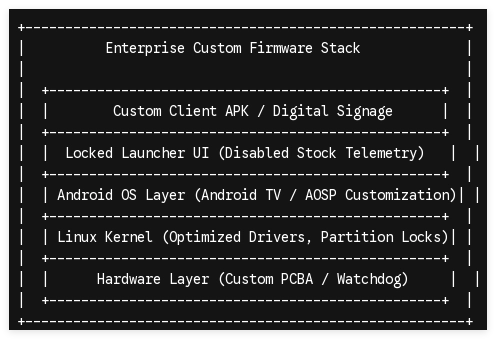
Boot Behavior and Kiosk Locks
Through deep firmware-level modification of the Android Source Project (AOSP) or Google TV system image, system engineers can achieve a locked down, single-purpose execution state:
-
Boot-Animation and Splash Logo Branding: Injecting client-specific logos directly into the bootloader partition ensures a professional appearance from the moment power is applied.
-
Auto-Start and Kiosk Mode: Modifying the framework layer to launch a specific client APK automatically upon boot, completely bypassing the native setup wizard or home screen.
-
Status Bar and Navigation Restriction: Disabling user-accessible drop-down menus, volume controls, and settings panels at the kernel level to prevent on-site tampering.
Centralized OTA Infrastructure
Commercial devices scattered across diverse geographic networks cannot be updated manually. A robust deployment relies on a dedicated, private Over-The-Air (OTA) update system server. By embedding custom OTA check-in configurations into the system properties (build.prop), enterprise managers can push verified delta updates, security patches, or application upgrades silently in the background, ensuring all connected boxes remain secure and operational without breaking active field systems.
4. Securing Enterprise-Grade Streaming Infrastructure
For system integrators, purchasing generic retail streaming players introduces unmanageable risks into commercial projects. Maximizing project margins and operational reliability requires a partner that focuses on wholesale B2B manufacturing and deep engineering customization.
SZTomato provides complete engineering control over your hardware lifecycle. From initial PCBA circuit layout adjustments and specialized metal enclosure fabrication to low-level Android kernel optimization and custom API integration, our solutions ensure your infrastructure meets rigorous commercial standards.
Speak with our engineering team regarding custom PCBA or firmware requirements.
