















What is the preferred Streaming Media Player TV connection?
Hardware Architecture: Selecting the Preferred Streaming Media Player TV Connection for Commercial Fleets
Hardware failures in distributed commercial displays—whether digital signage networks, hospitality interactive TVs, or enterprise conferencing systems—frequently trace back to the physical layer. For system integrators and OEM/ODM procurement managers, selecting a streaming media player based solely on processing power while ignoring the display interface architecture introduces long-term deployment risks.
Choosing the preferred streaming media player TV connection requires balancing bandwidth requirements, mechanical durability, and firmware-level communication protocols.
1. HDMI 2.1 vs. USB-C DP Alt Mode: The Commercial Bandwidth and Power Trade-Off
In enterprise deployments, the choice between HDMI and USB Type-C DisplayPort Alternate Mode (DP Alt Mode) dictates the structural design of your Printed Circuit Board Assembly (PCBA).
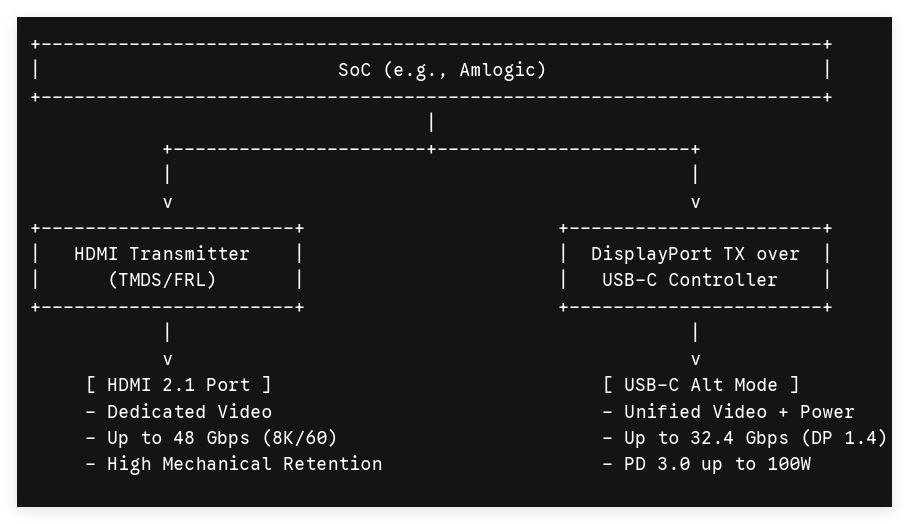
HDMI 2.1: The Baseline for Uncompressed 4K/8K Signage
HDMI 2.1 remains the industry standard interface for dedicated media players. Transitioning from Transition-Minimized Differential Signaling (TMDS) used in HDMI 2.0 to Fixed Rate Link (FRL) signaling allows HDMI 2.1 to achieve an aggregate bandwidth of 48 Gbps.
-
Native 4K@120Hz and 8K@60Hz Execution: Crucial for ultra-high-definition retail arrays without resorting to heavy chroma subsampling (maintaining uncompressed 4:4:4 color depth).
-
Mechanical Stability: Standard HDMI connectors offer higher structural resistance against shearing forces when paired with locking screws or industrial chassis brackets, minimizing physical disconnects in public high-vibration environments.
USB-C DP Alt Mode: The Unified Interface for Interactive Kiosks
USB-C utilizes the DisplayPort protocol over its high-speed lanes while simultaneously managing data and power delivery via USB Power Delivery (USB PD 3.0).
-
Single-Cable Topology: Maps DisplayPort 1.4 or 2.0 native video signals alongside bidirectional touch-screen data (USB 2.0/3.2 Gen 2) and up to 100W of power supply over one cable.
-
Use-Case Fit: Ideal for interactive point-of-sale (POS) kiosks and smart hospitality installations, significantly reducing cabling clutter and assembly labor.
2. Resolving EDID Handshake Failures and HDCP Conflicts in Distributed Hardware
A significant driver of post-deployment support tickets is the "Black Screen" phenomenon. This occurs when the streaming media player fails to parse Extended Display Identification Data (EDID) or drops High-bandwidth Digital Content Protection (HDCP) keys during hot-plug events.
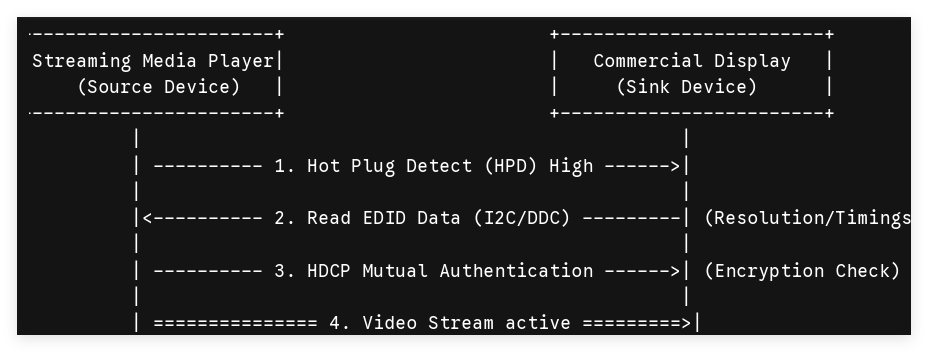
When a commercial display power-cycles during off-hours, the Hot Plug Detect (HPD) pin drops low. Upon boot, if the display’s EDID ROM does not respond within the millisecond windows defined by the HDMI specification, the Android TV box operating system defaults to a safe resolution (often 720p) or halts video output entirely.
Firmware-Level Mitigations for OEM/ODM Customization
To ensure operational resilience, hardware engineers must implement specific firmware overrides within the bootloader (uboot) and kernel level:
-
EDID Emulation & Hardcoding: For fixed-display deployments (e.g., standard 1080p or 4K signage panels), the kernel should be flashed to ignore real-time DDC (Display Data Channel) polling. Forcing a static, localized EDID configuration file ensures the player outputs the target resolution regardless of the display's power state.
-
HDCP Fallback Logic: In commercial architectures displaying non-protected corporate or menu content, HDCP checks should be programmatically disabled at the Android kernel level (property_set("media.vendor.hdcp.value", "0")). This eliminates the constant cryptographic re-authentication cycle, preventing intermittent signal drops caused by aging matrix switchers or long active optical cables (AOC).
3. Comparative Engineering Matrix: Commercial Display Interfaces
The following breakdown provides a direct architectural comparison of the primary display interfaces used during the PCBA engineering and design phase for B2B streaming devices.
| Technical Parameter | HDMI 2.1 (FRL) | USB-C (DP Alt Mode 1.4) | Legacy HDMI 2.0 (TMDS) |
|---|---|---|---|
| Max Native Bandwidth | 48 Gbps | 32.4 Gbps | 18.0 Gbps |
| Max Resolution/Refresh | 8K @ 60Hz / 4K @ 120Hz | 8K @ 30Hz / 4K @ 60Hz | 4K @ 60Hz |
| Bi-directional Data Lanes | No (Limited to CEC/ARC) | Yes (USB 3.2 Gen 2 up to 10 Gbps) | No |
| Native Power Delivery | No (Signal only) | Yes (Up to 100W PD 3.0) | No |
| Primary Failure Point | Mechanical port wear without locking hardware | Pin misalignment under lateral stress | Bandwidth saturation causing signal noise |
| B2B Target Application | High-bitrate 24/7 digital signage loops | Interactive touchscreen kiosks, clean-desk hardware | Budget hospitality hospitality TVs |
4. OEM/ODM Sourcing Optimization: Aligning Interface Choice with System Architecture
Engineers must choose interface configurations based on the physical environment of the installation:
-
Long-Distance Signal Routing (>10 Meters): HDMI 2.1 paired with Active Optical Cables (AOC) is preferred. AOC converts electrical signals to optical pulses right inside the connector head, preventing electromagnetic interference (EMI) from high-voltage lines in industrial environments.
-
Direct-Attach Integrated Enclosures: USB-C DP Alt Mode offers structural savings. Eliminating separate DC power jackets and auxiliary USB touch-controller boards lowers the bill of materials (BOM) cost and increases Mean Time Between Failures (MTBF) by reducing the number of discrete solder points.
Engineering Custom Media Players for Global Scale
Maximizing hardware uptime across international commercial deployments requires look past basic consumer specifications. Hardware reliability depends on clean layout design on the PCBA, robust ESD protection on differential lanes, and deterministic firmware handling of EDID protocols.
As an established ODM/OEM manufacturing partner specializing in high-performance Android TV boxes and digital signage logic boards, SZTomato delivers tailormade firmware modifications and ruggedized hardware interfaces built for continuous 24/7 operation. Contact our engineering team today to review your project specifications, obtain Gerber layout files, or request custom kernel builds optimized for your enterprise display network.
